Demo Laser 2D
The demo will produce the result shown in the image below:
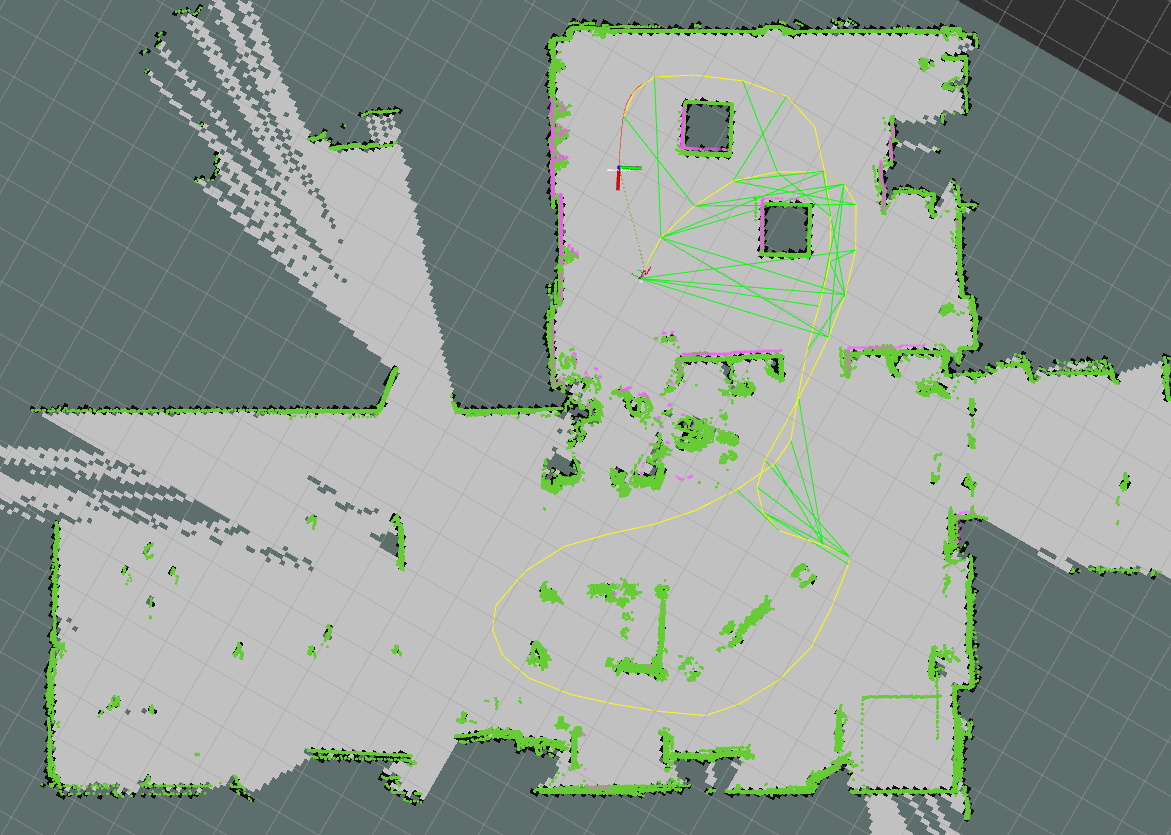
The WOLF ROS demo laser 2d: rendered maps in pointcloud and occupancy grid forms, with the factor graph showing motion factors in yellow, and loop closures in green.
ROS2
This demo is based on ROS2. We recommend installing the desktop-full version compatible with your ubuntu distribution.
This demo requires that a ROS2 workspace is already set up and sourced.
Required WOLF plugins
Make sure that you have installed the following WOLF plugins (and their dependencies):
Required WOLF ROS2 packages
Clone the WOLF ROS2 node:
cd ${ROS_WS}/src
git clone -b main https://gitlab.iri.upc.edu/mobile_robotics/wolf_projects/wolf_ros2/wolf_ros2_node.git
Clone the
wolf_ros2_laserpackage:cd ${ROS_WS}/src git clone -b main https://gitlab.iri.upc.edu/mobile_robotics/wolf_projects/wolf_ros2/wolf_ros2_laser.git
This package contains the subscriber for the laser scan and publishers for different types of laser-based maps.
Clone & launch the demo
Clone the WOLF ROS demo Laser 2D:
cd ${ROS_WS}/src
git clone https://gitlab.iri.upc.edu/mobile_robotics/wolf_projects/wolf_ros2/demos/wolf_ros2_demo_laser2d.git
Compile:
cd ..
colcon build --symlink-install --packages-up-to wolf_ros2_demo_laser2d
The following ros2 bags will be automatically downloaded:
basic,advancedandturtlebot.Launch the demo specifying the rosbag using the argument
bag(default isadvanced):ros2 launch wolf_ros2_demo_laser2d demo_laser2d.launch.py bag:=advanced
Troubleshooting
When launching the demo, you may experience a runtime error of type what(): Couldn't load resource with path xxxxxx.so.
To resolve this, you may need to update the cache for the linker:
sudo ldconfig
No outputs are printed. Now, try to launch again the demo.